

Getting Help
- Bug reports: Open a ticket on GitHub in the appropriate plugin repository.
- Community help: Join our Discord.
Reading Stack Traces
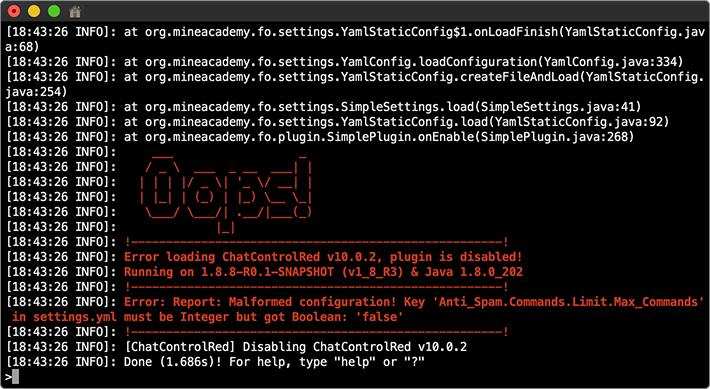
Always check your startup log and console for errors. Paste the entire log to pastebin.com and share the link.
Read the error message carefully — it often tells you exactly what needs to be fixed:
For YAML syntax errors, validate with this online parser.
Before You Report an Issue
- Delete the library/ folder (server stopped) and restart to re-download libraries.
- Try to solve it yourself first — give it 10 minutes.
- Be specific: Include what you did, what you expected, and what happened. "Plugin doesn't work" is not helpful.
- Search the issue tracker first (Ctrl+F).
- Isolate: Disable other plugins to verify the issue is ours.
What You Should NEVER Do
Critical Don'ts
- Never use /reload or plugin managers (PlugMan, etc.) with our plugins - always do a clean server restart
- Never edit any files on a running server - always shut down first
- Never mix different versions of the same plugin on a network - this will break things
- Never use outdated versions of Minecraft, server software, or dependencies
Making A Proper Report
Include:
- Server version (
/version) - Steps to reproduce the issue
- Error logs via pastebin.com
- Potentially conflicting plugins
- Relevant config sections
Please be patient — we typically respond within 1-5 business days.