

Skills
What are Skills?
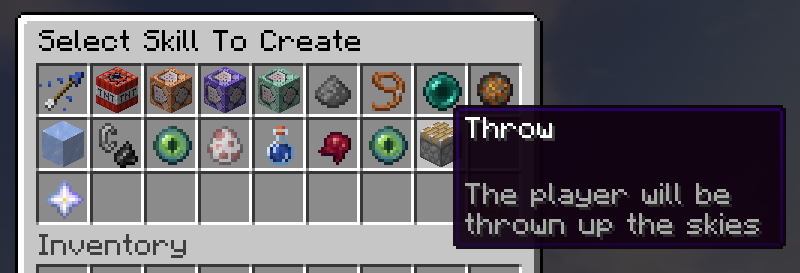
Skills are abilities you stack on a Boss. Each one gets its own delay, health range, messages and commands. A Boss can hold one of each, so 22 in total.
Open /boss menu > your Boss > Skills. Hit Create New to add one, or click an existing skill to configure it.
How a Boss picks a skill
Once a second, for every Boss in a loaded chunk, the plugin shuffles its skills and walks the list:
- Still on its Delay? Skipped.
- Health Range does not match the Boss's current health? Skipped.
- Otherwise it fires, rolls a new delay, and stops the loop if Stop More Skills is on.
Nothing runs on an empty server.
A skill can also bail out, say when nobody is close enough. That burns no delay, so it retries a second later.
Players skills ignore
Creative and Spectator players, vanished players, Citizens NPCs, invulnerable entities and anyone inside a WorldGuard region with boss-target set to false.
Testing in Creative is the number one reason skills look broken. The plain Commands skill is the exception, it never looks at players at all.
Settings every skill has
| Setting | Icon | What it does |
|---|---|---|
| Skill Settings | Iron Horse Armor | Options specific to this skill, listed further below |
| Delay | Clock | How long before the skill may fire again |
| Messages | Paper | What the Boss says to the affected player |
| Commands | Command Block | Console or player commands to run when the skill fires |
| Health Range | Golden Apple | The Boss health percent window in which the skill may fire |
| Stop More Skills? | Dye | Whether to stop trying other skills after this one succeeds |
Delay
One value like 2 minutes, or a range like 30 seconds - 3 minutes for a random pick each time. It only starts counting after the skill fires. Editing it clears that skill's cooldown on every Boss alive right now, not just this one.
Health Range
This is how you build phases. Enter a percent range such as 0 - 50 and the skill only fires inside it. Both ends count, and the default 0% - 100% means always.
The percent is live health over max health, so it tracks the Boss as players chew through it.
| Skill | Health Range | Result |
|---|---|---|
| Throw | 50 - 100 | Phase 1, above half health |
| Minions | 0 - 50 | Phase 2, below half health |
A Boss holds one copy of each skill, so you cannot add the same skill twice with two ranges. Use two different skills, or fire a command from one.
Tip
Set Debug: [skills] in settings.yml to print why every skill fired or got skipped, health percent and range included.
Messages
One random message from the list goes to the player the skill hit. Separate them with |, type none to hide them. & colors, MiniMessage tags, {player}, {boss} and the Boss variables all work.
Every skill except the three Commands ones ships with three default messages, so leave the button alone and your Bosses still talk.
Commands
Click Commands > Create new and type the command without the /. Each one has a Run Chance (0% to 100%, new commands start at 100%) and a Run As Console? toggle (on by default).
Every special syntax from the Boss Commands page works here: tell, broadcast, tell-damagers, tell-damagers-list, broadcast-damagers-list (both with the optional -top-<amount> suffix) and discord.
Warning
Run the command as the player and only {player} and {player_name} get replaced. Keep Run As Console? on if you need {boss_name}, {boss_alias} or any other Boss variable.
The plain Commands skill has no target player at all, so {player}, {killer} and tell do nothing there. Use Commands For Target or Commands For Nearby instead.
Stop More Skills?
On by default: the Boss stops after this skill succeeds, so one skill fires per second. Turn it off on several skills to let them fire together.
Skills that need a target
Half the skills hit the player the Boss is fighting. They do nothing unless the Boss has a target, in the same world, within Skills.Target_Range blocks (8 by default, in settings.yml).
| Needs a target | Finds its own players |
|---|---|
| Arrow, Bomb, Commands For Target, Confuse, Disarm, Fireball, Freeze, Ignite, Minions, Potion, Steal Life | Blizzard Barrage, Chrono Stasis Field, Commands, Commands For Nearby, Dragon's Breath Cone, Enderman, Fire Tornado, Lightning, Shulker Bullet Hell, Teleport, Throw |
If a targeting skill never fires, raise Skills.Target_Range or fix the Boss's targeting under Settings > AI & Behavior.
Available skills
🏹 Arrow
Shoots an arrow at the target, optionally carrying potion effects that land when the arrow hits.
- Skill Settings — pick the potion effects the arrow applies, with type, duration and level
- Default delay:
2 seconds - 5 seconds
❄️ Blizzard Barrage
Buries the arena in snowballs that damage and slow every player they hit. The snowballs never break blocks.
- Snowballs Per Second — 1 to 20, default 8. The Boss fires in bursts, so the real rate rounds to 5, 10, 15 or 20
- Duration — up to 20 seconds, default 5 seconds
- Damage — 0.5 to 20 per snowball, default 2
- Every hit also applies Slowness II for 3 seconds
- Needs a player within 25 blocks to start, but the snowballs fly in random directions rather than at anyone
- The snowball damage needs Minecraft 1.11 or newer
- Default delay:
30 seconds - 1 minute
💣 Bomb
Spawns primed TNT above the target.
- Fuse Time — up to 2 minutes, default 3 seconds
- Blocks Height — 1 to 255 blocks above the player, default 7
- Power — explosion power from 0.01 to 100, default 4
- Destroy Blocks — off by default
- Default delay:
30 seconds - 1 minute
⏳ Chrono Stasis Field
Throws a clock at the nearest player that blooms into a dome of warped time. Anyone inside gets Slowness II and Mining Fatigue III, refreshed four times a second. It deals no damage.
- Field Radius — 2 to 10 blocks, default 4
- Duration — up to 30 seconds, default 6 seconds
- Searches up to 25 blocks for its victim
- The dome stays where it was cast, so players can walk out of it. It also stops early if the Boss runs off
- Default delay:
45 seconds - 1 minute
🖥️ Commands
An empty skill that runs console commands on an interval. It has no target player and no messages, so {player} and tell will not work.
- Default delay:
30 seconds - 1 minute
📡 Commands For Nearby
Runs your commands for every nearby player, closest first.
- Radius — 1 to 50 blocks, default 5
- Max Players — how many players to run for, or
-1for all of them (default) - The messages and the whole command list run once per player, so a crowded arena multiplies them
- Default delay:
30 seconds - 1 minute
🎯 Commands For Target
Runs your commands for the player the Boss is currently attacking.
- Default delay:
30 seconds - 1 minute
😵 Confuse
Spins the target's view a random 45 to 314 degrees and blinds them for 3 seconds. No settings.
- Default delay:
10 seconds - 15 seconds
🔫 Disarm
Makes the target drop whatever they are holding. Does nothing if their hand is empty. No settings.
- Default delay:
1 minute - 2 minutes
🐉 Dragon's Breath Cone
Sprays a cone of dragon's breath in front of the Boss. The spray lasts 1.5 seconds and damages everyone inside the cone once per second, so twice per cast.
- Cone Angle — 10 to 180 degrees, default 60
- Cone Range — 2 to 20 blocks, default 8
- Damage — 0.5 to 20 per damage tick, default 4
- Aimed where the Boss is looking. The damage check ignores height, so a player above or below the Boss still takes it
- Default delay:
15 seconds - 30 seconds
🌀 Enderman
Teleports the Boss onto a random nearby player.
This skill works with Custom_Settings.Enderman_Teleport: false, allowing deliberate teleports while natural Enderman teleports remain blocked.
- Radius — 1 to 50 blocks to search, default 5
- Default delay:
45 seconds - 2 minutes
🔥 Fire Tornado
Summons a vortex of flame that drifts toward the nearest player. Anyone inside the radius is dragged toward the middle, and anyone who touches the core takes damage, catches fire for 2 seconds and is thrown upward.
- Speed — how fast the vortex drifts, 0.05 to 2.0, default 0.35
- Duration — up to 30 seconds, default 8 seconds
- Radius — 2 to 20 blocks, default 5
- Damage — 0.5 to 20, dealt five times a second to anyone in the core, default 2
- The vortex never wanders more than 12 blocks from the Boss
- Radius sets how far the vortex pulls and damages, not how wide the flames look
- Default delay:
30 seconds - 1 minute
☄️ Fireball
Launches a ghast fireball at the target.
- Power — explosion power from 0.01 to 100, default 1.8
- Destroy Blocks — off by default
- Default delay:
20 seconds - 50 seconds
🧊 Freeze
Locks the target in place. Flying and sprinting are cut off too, and the player is released if they log out or respawn.
- Duration — up to 10 minutes, default 3 seconds
- Cobweb — show a cobweb at the player's feet when that block is air. It is a client-side illusion, your world is never touched. On by default
- Default delay:
20 seconds - 40 seconds
🔥 Ignite
Sets the target on fire.
- Duration — up to 3 minutes, default 5 seconds
- Default delay:
20 seconds - 50 seconds
⚡ Lightning
Strikes the first nearby player with a real lightning bolt. Mobs take no damage from it and the struck player does not catch fire, but other players in the blast still get hurt and the bolt can start fires.
- Radius — 1 to 50 blocks to search, default 5
- Default delay:
30 seconds - 1 minute
👥 Minions
Spawns other Bosses of your choice to fight alongside this one.
- Select Bosses — pick which of your Bosses appear as minions
- Amount — 1 to 20 of each, default 1
- Radius — 1 to 50 blocks to place them in, default 5
- Kill On Death — remove the minions when the Boss dies, off by default
- Minions come after the Boss's own target, and count as reinforcements for spawning limits
- Default delay:
30 seconds - 1 minute
💊 Potion
Applies potion effects to the target, overriding existing effects of the same type.
- Skill Settings — pick effects with type, duration and level
- Add at least one effect. With an empty list the skill still counts as fired and blocks the rest of the Boss's skills for that second
- Default delay:
30 seconds - 1 minute
🐚 Shulker Bullet Hell
Fires a swarm of homing shulker bullets at nearby players. Bullets only hurt players, and any that never reach anyone disappear after 10 seconds.
- Bullet Count — 1 to 30, default 10
- Levitation Duration — up to 1 minute, default 8 seconds
- Searches up to 25 blocks for victims and spreads the bullets between them
- Shulker bullets arrived in Minecraft 1.9, so the skill does nothing on older servers
- Default delay:
30 seconds - 1 minute
💉 Steal Life
Drains part of the target's current health and heals the Boss by the same amount, up to its maximum health.
- Percent To Take — above 0 up to 100 percent of the player's current health, default 20%
- Default delay:
2 minutes - 4 minutes
🧲 Teleport
Pulls the first nearby player to the Boss.
- Radius — 1 to 50 blocks to search, default 5
- Default delay:
45 seconds - 2 minutes
🚀 Throw
Launches every nearby player up and away from the Boss. Mind the fall damage.
- Radius — 1 to 50 blocks to search, default 5
- Power — 0.01 to 10, default 1.2
- Default delay:
30 seconds - 1 minute
Editing skills in YAML
Skills live in your Boss's file under plugins/Boss/bosses/<BossName>.yml, keyed by the skill's internal name (listed below the example, they do not always match the menu name):
Skills:
  Fire_Tornado:
    Delay: 30 seconds - 1 minute
    Commands: []
    Messages:
    - A <red>blazing tornado <gray>tears across the ground toward you!
    Stop_More_Skills: true
    Health_Min_Percent: 0
    Health_Max_Percent: 100
    Settings:
      Speed: 0.35
      Duration: 8 seconds
      Radius: 5
      Damage: 2.0
The internal names are Arrow, Blizzard, Bomb, Chrono_Stasis, Commands, Commands_Nearby, Commands_Target, Confuse, Disarm, Dragon_Breath, Enderman, Fire_Tornado, Fireball, Freeze, Ignite, Lightning, Minions, Potions, Shulker_Bullets, StealLife, Teleport and Throw.
Use the menu whenever you can. It validates every value and reloads the Boss for you.
Extending With Custom Skills
Developer API
You can create custom skills with our API. They show up in the Skills menu automatically. See the Developer API page.