

Commands
For commands Bosses can run on spawn/death/health threshold, see Boss Commands.
- [] = optional arguments
- <> = required arguments
TIP: The short variant for /boss is /b. Most subcommands have a one-letter alias too: butcher|b, egg|e, find|f, list|l, menu|m, tools|t, remove|rm, location|loc, region|rg, reload|rl.
You can view the required permission directly within the error message when you attempt to execute a command you don't have access to.

Main Commands
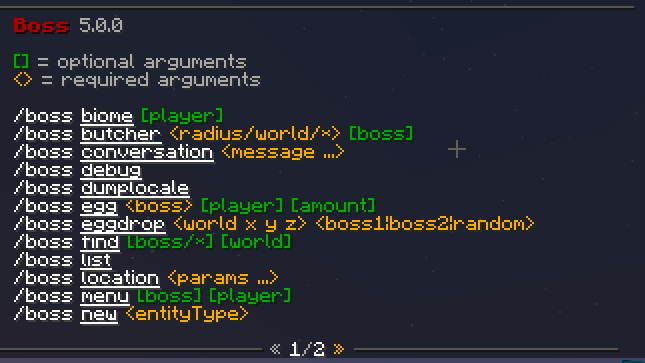
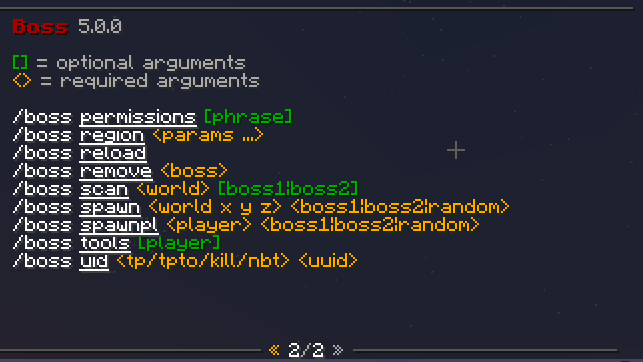
/boss menu
Open the main Boss GUI menu to manage Bosses, spawn rules, tools and settings.
/boss new
Create a new Boss. Usage: /boss new <entityType>. Aliases: create, add. Starts a chat conversation to name it. Names allow English letters and numbers only, 3 to 24 characters.
/boss duplicate
Copy a Boss with all its settings under a new name. Usage: /boss duplicate <boss> <newName>. Aliases: copy, clone.
/boss list
List all installed Bosses.
/boss spawn
Spawn a Boss at coordinates. Usage: /boss spawn <world x y z> <boss1|boss2|random>. Use ~ ~ ~ ~ for your own position. Works from console and command blocks.
/boss egg
Get a Boss spawner egg that you can place or give to players. Usage: /boss egg <boss> [player] [amount]. The two optional arguments do not combine: /boss egg Zombie Notch hands one egg to Notch, /boss egg Zombie Notch 5 hands 5 to you.
/boss eggdrop
Drop Boss egg(s) at a specific world location. Usage: /boss eggdrop <world x y z> <boss1|boss2|random>. Supports ~ for relative coordinates. Use | to spawn multiple bosses or random for a random boss.
/boss find
List every alive Boss in loaded chunks, each with a teleport and a kill button. Usage: /boss find [boss/*] [world].
/boss butcher
Kill spawned Bosses. Usage: /boss butcher <radius/world/*> [boss], radius from 0 to 10,000.
/boss scan
Scan offline chunks on disk and remove Bosses from unloaded chunks. Usage: /boss scan <world> [boss1|boss2]. Console only, kicks every player, and you must run it twice to confirm. Not available on Folia.
/boss spawnpl
Spawn Bosses near a specific player. Usage: /boss spawnpl <player> <boss1|boss2|random>.
/boss biome
Show what biome you are currently standing in. Usage: /boss biome [player].
/boss uid
Manage an entity by UUID. Use /boss uid tpto <uuid> <world> <x> <y> <z> to move it, or /boss uid <tp/kill/nbt> <uuid> for the other actions. Coordinates must be whole numbers; players can use ~ for their current world or coordinate.
Every action also accepts a Boss name in place of the UUID, which is what you want when you run the command from a command block or another plugin and have no way to learn the entity UUID. tpto, kill and nbt then apply to every alive Boss of that name, and tp takes you to the closest one. Only Bosses in loaded chunks are matched, the same as /boss find.
boss uid tpto Jefe world 100 64 100The tpto command can move an Enderman Boss with Custom_Settings.Enderman_Teleport: false.
/boss region
Create and manage Boss spawn regions. Use /boss tools to get the region tool first, then /boss region new <name> after selecting the area. Only registered while Register_Regions is true in settings.yml.
/boss tools
Open the tools menu to get the Region Tool, Location Tool, Info Tool and Tamer Tool.
/boss skull
Get player skulls to place on Boss heads. Usage: /boss skull <name/url/uuid/base64> <value> [player]. See mcheads.ru for skull data examples. Run from console for long base64 strings.
/boss location
Create and manage Boss spawn locations. Sub-commands: new <name>, tool, rem <name>, view [name], tp <name>, list, point. These saved points feed the On A Block At A Given Time, On Entering A Region, Respawn After Death and After A Kill Goal spawn rules.
/boss remove
Permanently delete a Boss configuration. Usage: /boss remove <boss>. This only removes the Boss type definition, not already-spawned entities.
/boss countunloaded
Debug command to count Bosses in unloaded chunks. Usage: /boss countunloaded <save/load> or /boss countunloaded <world> <Boss/all>.
/boss reload
Reload the plugin configuration.
/boss perms
Display all plugin permissions.
/boss dumplocale
Copy the language file into lang/ so you can edit the messages.
/boss debug
ZIP your configuration for a bug report.
/boss conversation
Answer a chat conversation manually when another plugin swallows your chat.