

Commands
Hover over commands in-game for detailed usage info.
Notation: [] = optional, <> = required
Tip
/chc is short for /chatcontrol, /ch for /channel. Change aliases via Command_Aliases in settings.yml.
Permissions
Type /chc perms to view all available command permissions.
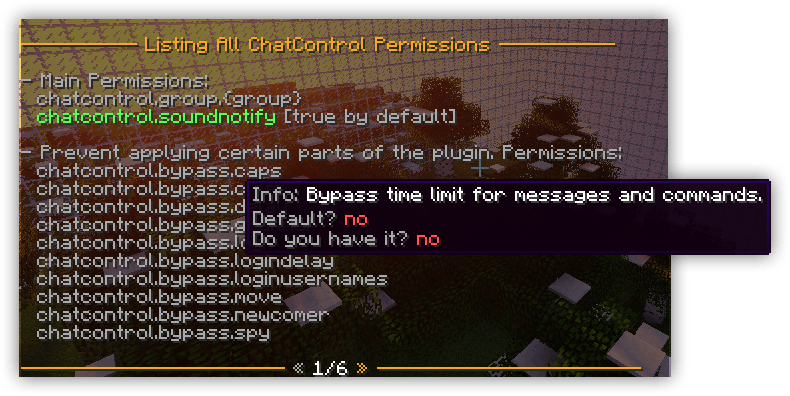
You can also view the required permission directly in the error message when you attempt to execute a command you don't have access to.

Main Commands
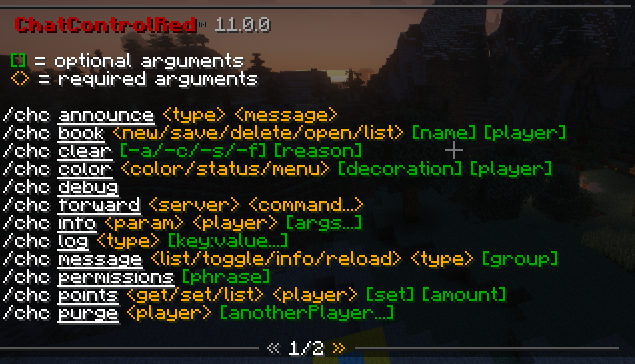
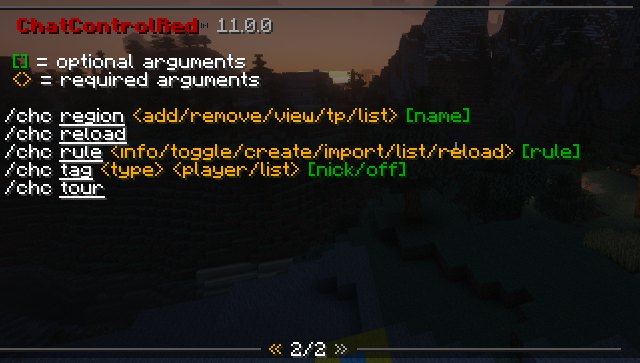
To see more on how commands works and how it can be used, simply hover your mouse over it and additional information will follow.
/chc announce
Send a message (chat, title, boss bar, action bar, toast, or JSON) to everyone on your server or network.
/chc book
Create a custom book. Read it yourself, send to players, or use in formats/rules.
/chc clear
Clear chat. Flags: -a (anonymous), -s (silent). Supports proxy and optional reason.
/chc color
Set chat color/decoration via command or GUI. Supports HEX on 1.16+.
Gradient colors: Use color1-color2 syntax to set a two-color gradient on your chat messages. Works with both named colors and HEX codes.
Examples:
/chc color red-blue— gradient from red to blue/chc color #00C6FF-#0068E8— gradient from two HEX colors/chc color #FF5555-#55FF55 bold— gradient with bold decoration/chc color reset— reset color (and gradient)
/chc debug
Compiles all files into a ZIP for bug reports (sensitive data removed).
/chc forward
Send a command to proxy or another server. Requires chatcontrol.command.forward on proxy too.
/chc info
View player nicks, data, test variables, or check newcomer status.
/chc log
Search player activity (messages, commands, books, mail, PMs). Supports filtering: /chc log all by:kangarko in:1h.
/chc message
Manage join, quit, death messages and timed broadcasts in-game.
/chc permissions
View all permissions and which ones you have.
/chc points
Manage warning points. Players accumulate points for spam/swearing; actions trigger at thresholds.
/chc purge
Remove all messages from a player (even after disconnect). Proxy supported.
/chc region
Create 3D regions for use with require region / ignore region in Rules. For example, you can make stricter antispam in your spawn area, or write a rule that completely prevents writing in your PvP arenas.
/chc reload
Reloads config. Some features (listener priorities, console filter) require a full restart.
/chc rule
Add, import, list, reload or toggle chat filters. A rule is a way to catch anything in your chat, commands, signs, items, books or server packets and execute actions on it. For example, typing "apple" gives a player a warning. Used against spam, swears, ads, bots, or even to create help systems, chat bots or new commands (like Skript). See Rules.
/chc sendformat
Send a formatted message using a format file. Usage: /chc sendformat [-reload] <format> <player> [message]. Use all as the player to send to everyone on the server. With a remote database and proxy enabled, the target player can be connected to any server on your network.
/chc tag
Set custom nick/prefix/suffix for players (admin). Proxy supported.
/chc tour
Quick getting-started guide.
/chc migrate
Converts ChatControl 10 syntax to 11 (%syntax% → {syntax}, hex colors → MiniMessage).
Channels Commands
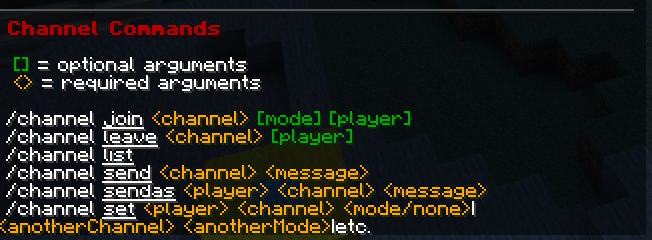
/ch join
Join a player a chat channel in a certain mode, either to write or to read it. Proxy is supported.
/ch set
Forcefully set or remove players from channels. Supports bulk execution. Ideal for scripting.
/ch leave
Leave a player (even on proxy) from a chat channel.
/ch list
List players in channels. Proxy is supported.
/ch send
Send message to a channel even if you are not joined in it.
/ch sendas
Send message to a channel as someone else. Great for automating, or simply trolling.
Base Plugin Commands
The following commands don't have a prefix such as /chc or /ch.
/ignore
Ignore a player's messages. Can also block their PMs. Set Ignore.Stop_Private_Messages to silent in settings.yml to make blocked DMs appear delivered to the sender (no "You're blocked!" reply).
/list
See online players (server or proxy), sorted by any key.
/mail
Send book-form messages to players (even offline). Supports auto-responder, forwarding, inbox/archive.
/me
Send a formatted message to chat.
/motd
Resend the join greeting message. Optionally append a type to preview a specific MOTD: /motd first_time, /motd newcomer or /motd default. Staff with permission can preview another player's MOTD with /motd <player> <type>.
/mute
Mute a player, channel, or entire server. Blocks join/quit/death messages, PMs, mail, sign placing, book writing, anvil renames and the commands listed in Mute.Prevent_Commands. List entries match the base command (/mail also blocks /mail send) or a single subcommand (/cmi broadcast blocks just that while keeping the rest of /cmi usable). Mutes from AdvancedBan, BanManager, CMI, EssentialsX and LiteBans running on the same backend server are honored the same way. With Voice_Chat.Enabled: true, also silences the player on Simple Voice Chat and Plasmo Voice. Mute messages support {duration_formatted} printing the duration in words, and {player_mute_reason} showing the reason while the player is muted.
/realname
Look up a player's real name from their nickname.
/reply
Reply to a private message (proxy + console supported).
/spy
See messages outside your reach (other channels, PMs, books, signs, commands). Toggle via command or GUI.
Add -s or -silent to /spy on, /spy off and /spy toggle to hide confirmation messages, for example /spy toggle chat global Steve -s from a menu plugin. Errors, /spy list and /spy status output stay visible.
/tag
Set your own nick, prefix, or suffix.
/tell
Send a private message.
/toggle
Disable receiving message types: announcement, broadcast, chat, mail, private_message, proxy_chat, sound_notify, join, quit, kick, death, timed, switch. For example, you can enable players to disable seeing death messages or timed message announcements.
Usage: /toggle <type> [player] for plugin parts and /toggle <type> [group] [player] for message types, where * as the group toggles every group of that type. The player argument lets the console or staff with chatcontrol.command.toggle.others toggle for someone else, which is handy for menu plugins running commands on behalf of players. /toggle list [player] shows what is toggled off.
Add -s or -silent to hide confirmation messages, for example /toggle chat Steve -s or /toggle join * Steve -s. Errors and /toggle list output stay visible.
Proxy Commands
/bcreload and /vcreload
Reloads proxy-side settings.yml and player messages.