

Permissions
Info
Here you can view all permissions this plugin supports. We recommend using LuckPerms or PermissionsEx (for older Minecraft versions) as a permission plugin, as these have proven stability over the many years of their course.
One of the best parts about ChatControl is that, you can view the required permission directly within the error message when you attempt to execute a command you don't have access to.

Important
Danger
1) If you are an operator or have the "*" permission and would like something not to apply for you, simply give yourself that as a negative permission. For example to stop yourself from automatically joining into channels, give yourself "-chatcontrol.channel.autojoin." permission. If you have LuckPerms, that would be "chatcontrol.channel.autojoin." permission with a value of "false".
2) The magic &k color has "obfuscated" permission name, such as "chatcontrol.color.obfuscated".
Channel Permissions
You can read more about channel auto-join permissions here: Channels Auto-Join.
Color Permissions
For legacy colors use chatcontrol.color.`{color} where {color} is the lowercase color name with underscores, e.g. chatcontrol.color.red or chatcontrol.color.dark_blue (not darkblue nor dark-blue). For hex colors use chatcontrol.hexcolor.`{color} with the code without #, e.g. chatcontrol.hexcolor.ccffdd. If you see the dump of the permissions file below, please note that chatcontrol.color.{color} can also have the color replaced with decorations too, not just legacy colors. So you can use:
- chatcontrol.color.bold
- chatcontrol.color.obfuscated
- chatcontrol.color.strikethrough
- chatcontrol.color.underlined
- chatcontrol.color.italic
For gradients in the /chc color menu, use ``chatcontrol.guigradient.{name}``` where is the lowercased gradient name (e.g.chatcontrol.guigradient.sunset, chatcontrol.guigradient.ocean`).
You can also grant chatcontrol.color.colors to allow all colors at once and chatcontrol.color.decorations to allow all decorations at once.
Permissions List
To list all permissions ChatControl has to offer, type "/chc perms". We moved our permissions list to the game because it was harder to maintain it here, and we can also show what permissions you have when you run this command in game.
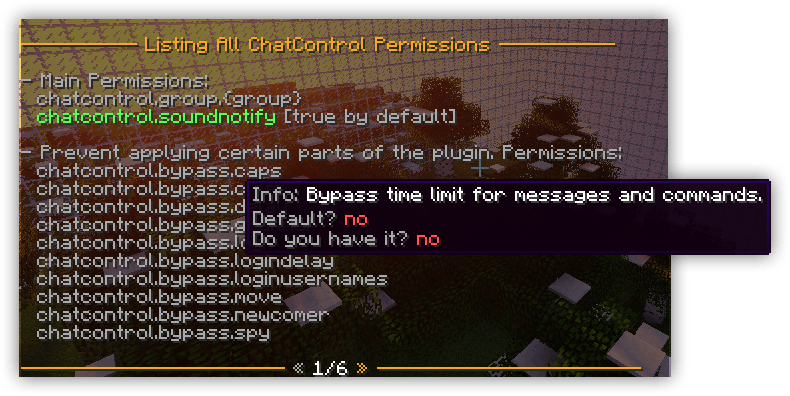
You can also view the required permission directly in the error message when you attempt to execute a command you don't have access to.
Permissions True By Default
Permissions False By Default
Proxy Permissions
All Permissions
Two things first
- The always up-to-date list is in-game, just run
/chc perms. - Some permissions end with a value you fill in, shown below as
<...>. Swap it for a real value, or use*to grant the whole group at once (e.g.chatcontrol.command.mute.*).
Commands
Let players use the plugin's commands (default label /chc).
| Permission | What it does |
|---|---|
chatcontrol.command.announce.<type> | Broadcast announcements. <type>: chat, title, actionbar, bossbar, toast |
chatcontrol.command.book | Read or save books used in rules |
chatcontrol.command.clear | Clear the game chat |
chatcontrol.command.clear.console | Clear the console |
chatcontrol.command.color | Change your own chat color and style |
chatcontrol.command.color.others | Change someone else's chat color and style |
chatcontrol.command.debug | Zip up your settings for a bug report |
chatcontrol.command.forward | Send a command to the proxy or another server |
chatcontrol.command.ignore | Ignore a player's messages and PMs |
chatcontrol.command.ignore.list | See who is ignoring whom |
chatcontrol.command.ignore.others | Make another player ignore or unignore |
chatcontrol.command.info | Print debug info about the plugin |
chatcontrol.command.list | Browse online players on the server or network |
chatcontrol.command.log | View recent chat and command history |
chatcontrol.command.mail | Use the in-game mail system |
chatcontrol.command.mail.send.all | Mail everyone who ever joined |
chatcontrol.command.mail.send.online | Mail everyone currently online |
chatcontrol.command.me | Send a formatted /me message |
chatcontrol.command.say | Send a formatted /say message (no proxy) |
chatcontrol.command.message | Edit join, MOTD and other player messages |
chatcontrol.command.migrate | Move data between MySQL and data.yml |
chatcontrol.command.motd | Show the message of the day |
chatcontrol.command.motd.others | Show the MOTD to another player |
chatcontrol.command.mute.<type> | Mute chat. <type>: player, channel, server, proxy |
chatcontrol.command.permissions | List all permissions (/chc perms) |
chatcontrol.command.points | Manage players' warning points |
chatcontrol.command.purge | Delete past messages |
chatcontrol.command.realname | Look up a player's real name and nick |
chatcontrol.command.region | Manage map regions used in rules |
chatcontrol.command.reload | Reload the plugin config |
chatcontrol.command.reply | Reply to the last person who PM'd you |
chatcontrol.command.rule | Manage the rules system |
chatcontrol.command.script | Run JavaScript scripts |
chatcontrol.command.sendformat | Send a message through a specific format |
chatcontrol.command.spy | Turn spying on players on or off |
chatcontrol.command.tag.<type> | Set your own tag. <type>: prefix, suffix, nick |
chatcontrol.command.tag.admin | Manage other players' tags |
chatcontrol.command.tell | Send a private message |
chatcontrol.command.testrules | Test a message against your rules |
chatcontrol.command.testsave | Force-save player data to the database |
chatcontrol.command.tour | Open the plugin intro tour |
chatcontrol.command.toggle.<type> | Toggle seeing a feature. <type>: mail, announcement, me, pm, death, join, kick, quit, list, soundnotify |
chatcontrol.command.toggle.on | Turn a toggle on |
chatcontrol.command.toggle.off | Turn a toggle off |
chatcontrol.command.toggle.others | Toggle plugin parts and messages for other players |
chatcontrol.command.update | Refresh a player's tab-list name |
Channels
<channel> = a channel name from settings.yml. <mode> = read or write.
| Permission | What it does |
|---|---|
chatcontrol.channel.autojoin.<channel>.<mode> | Auto-join a channel in a mode when you log in |
chatcontrol.channel.join.<channel>.<mode> | Join a channel with /channel join |
chatcontrol.channel.join.others | Join other players into channels |
chatcontrol.channel.leave.<channel> | Leave a channel with /channel leave |
chatcontrol.channel.leave.others | Make other players leave channels |
chatcontrol.channel.list | List players in channels |
chatcontrol.channel.list.options | Mute or kick players from the channel list |
chatcontrol.channel.send.<channel> | Send a one-off message to a channel |
chatcontrol.channel.sendas.<channel> | Send a message to a channel as another player |
chatcontrol.channel.set | Force-set which channel a player is in |
Colors & Formatting
Let players use colors and formatting in what they type.
| Permission | What it does |
|---|---|
chatcontrol.color.<name> | Use a & color or style. <name> is lowercase with underscores: red, dark_blue, bold, italic, underlined, strikethrough, obfuscated, ... |
chatcontrol.hexcolor.<hex> | Use a hex color, e.g. ccffdd (no #) |
chatcontrol.action.<action> | Use clickable/hover MiniMessage tags. <action>: hover, head, click, insertion, rainbow, shadow, lang, transition, font. Can be abused, hand out carefully |
chatcontrol.guicolor.<name> | Pick a named color in the /chc color menu |
chatcontrol.hexguicolor.<hex> | Pick a hex color in the /chc color menu |
chatcontrol.guigradient.<name> | Pick a gradient in the /chc color menu, e.g. sunset |
chatcontrol.use.color.<place> | Actually apply your colors somewhere. <place>: chat, me, prefix, nick, suffix, private_message |
Chat
| Permission | What it does |
|---|---|
chatcontrol.chat.read | See chat messages |
chatcontrol.chat.write | Write chat messages |
chatcontrol.chat.links | Make your URLs clickable |
Spying
Spy on what players do. <type>: chat, command, private_message, mail, sign, book, anvil.
| Permission | What it does |
|---|---|
chatcontrol.spy.<type> | Spy on one type of action |
chatcontrol.spy.autoenable | Start spying everything automatically on join |
Bypasses
Let trusted staff skip filters and limits. Hand these out carefully.
| Permission | What it skips |
|---|---|
chatcontrol.bypass.caps | The anti-caps filter |
chatcontrol.bypass.clear | Keeps your chat when someone clears chat |
chatcontrol.bypass.delay.chat | The cooldown between messages |
chatcontrol.bypass.delay.command | The cooldown between commands |
chatcontrol.bypass.grammar | Auto-capitalize and add-a-dot grammar fixes |
chatcontrol.bypass.log | Logging of your messages and commands |
chatcontrol.bypass.login.usernames | The disallowed-nickname block when joining |
chatcontrol.bypass.move | The antibot "move before you chat" check |
chatcontrol.bypass.newcomer | Rules that only apply to newcomers |
chatcontrol.bypass.spamkick | The vanilla spam kick when typing fast |
chatcontrol.bypass.signduplication | The antibot sign-duplication check |
chatcontrol.bypass.mute | ChatControl player, channel, server and proxy mutes (chat, commands, signs, books, anvils, join/quit/death messages). Does not bypass mutes from third-party plugins such as AdvancedBan, BanManager, CMI, EssentialsX or LiteBans |
chatcontrol.bypass.period | The repeated-period antispam check |
chatcontrol.bypass.range | Channel range, reach everyone on all worlds (off even for OPs) |
chatcontrol.bypass.range.world | Channel range, same world only (off even for OPs) |
chatcontrol.bypass.reach | Lets you message players who ignore you or have PMs off |
chatcontrol.bypass.vanish | Lets you see and message vanished players |
chatcontrol.bypass.similarity.chat | The "too similar" check for messages |
chatcontrol.bypass.similarity.command | The "too similar" check for commands |
chatcontrol.bypass.tabcomplete | Tab-complete filtering. Also checked by VelocityControl and BungeeControl for the proxy Tab_Complete filters, where it must be granted by a proxy-side permission plugin |
chatcontrol.bypass.warnpoints | Warning points and their punishments |
chatcontrol.bypass.parrot | The "parrot" antispam check |
chatcontrol.bypass.spy.<type> | Stops your own actions being spied on. <type>: chat, command, private_message, mail, sign, book, anvil |
chatcontrol.bypass.network.tabcomplete | Always see whole-network players when tab-completing PMs |
Discord, Receive & Extras
| Permission | What it does |
|---|---|
chatcontrol.discord.tag | Tag Discord roles with @ from in-game chat |
chatcontrol.receive.announcer | See your own /chc announce messages |
chatcontrol.soundnotify | Use the sound-notify @mention feature |
chatcontrol.group.<name> | Auto-assign a settings.yml group to a player. <name> = the group name |