

Common Issues
Important:
Critical Information
Using a proxy or remote database? Read these too.
<lang>, <font> and <selector> will disconnect modern clients. This was reported when the backend server was 1.8.8 running ViaVersion.💬 Chat
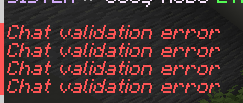
1.19+: "Chat validation error"
Solution
Set enforce-secure-profile to false in server.properties (in your root server folder, next to your .jar file) while the server is stopped, then start it again.
1.19+: Chat reporting / "This message is not secure"
Info
We send all messages as "system chat" so they cannot be reported. The "not secure" warning is harmless and can be ignored.
1.16+: Using HEX/RGB colors
Tip
Use MiniMessage syntax: <#123456>. Legacy &c still works. Since ChatControl 11, chat requires the MiniMessage <#132456> syntax regardless of Performance options. Color generator here.
/chc color is not applied to chat
Write {player_chat_color} and {player_chat_decoration} to format used in the channel you are writing to in formats/ folder before the {message} to apply chat colours to the message. Example:
  message:
    Message: "&7:&r`{player_chat_color}{player_chat_decoration}{message}`"
{player_prefix} is empty on Velocity / proxy
Warning
This is usually a Vault/LuckPerms context mismatch — if the prefix is assigned to a specific server context in LuckPerms, Vault returns empty on other servers. Run /lp user <name> meta info on the backend and check the prefix is in global context, not scoped to a server name.
Alternatively, use {luckperms_prefix} in your format (bypasses Vault entirely). Requires the LuckPerms PAPI expansion: /papi ecloud download LuckPerms, then /papi reload.
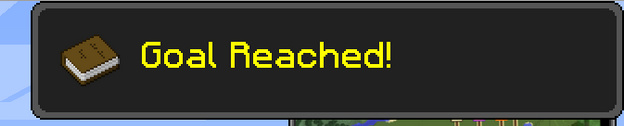
Toasts: How to edit "Goal Reached" for toast notifications?
Info
The "Goal Reached" header is hardcoded by Minecraft. You can only customize the text and icon that follow it.
Toasts: Private messages notifications spam the chat!
Tip
Run /gamerule announceAdvancements false.
Language messages don't change after /chc reload?
Warning
Restart the server — some messages require a clean start.
How can I turn off automatic channel join/spy for ops?
Tip
Give yourself or your group negative chatcontrol.channel.autojoin.{channel}.{mode} permission. Replace {channel} with channel name and {mode} with write/read, or use chatcontrol.channel.autojoin.* to disable all.
Placeholders like {some_placeholder} are not parsed inside a message
The {name} syntax only works in files in formats/. Inside the text of a message, such as what you type in chat or pass to /channel send, only the [name] syntax is parsed. We never run the variable engine over message content, otherwise any player could type a variable in chat and have it execute.
To use a placeholder inside a message, either put it in the channel format, or create a message variable in variables/ with Type: MESSAGE and call it with [name]. See JavaScript Variables.
Players can speak when muted (e.g. using BanManager / LiteBans)
Warning
ChatControl honors mutes from AdvancedBan, BanManager, CMI, EssentialsX and LiteBans automatically when the mute plugin runs on the same backend server, so update to the latest ChatControl first. If your mute plugin only runs on the proxy, or you use a different plugin such as LibertyBans, set Chat_Listener_Priority to HIGH in settings.yml and restart. See Listener Priorities for other plugin combinations.
My emoticons 😃 are just showing as ? / Special characters not working

Warning
- Use a compatible text editor.
- Wrap messages containing emojis in quotes
""in yml files.
The <center> prefix doesn't center properly with special characters
Info
Known limitation of the centering library. PRs welcome: https://github.com/kangarko/Foundation/blob/master/src/main/java/org/mineacademy/fo/ChatUtil.java
I can't see join/quit messages, even though they were properly enabled!
Warning
Check Messages.Apply_On in settings.yml includes the right message types. On a proxy, ensure only one side (proxy or backend) handles them — see Proxy vs backend below.
⌨️ Commands
The vanilla /msg is conflicting with the ChatControl /msg command
Tip
See our guide on fixing conflicting commands.
'/chc' is interfering with another plugin! (e.g ChestCommands)!
Tip
Remove chc from Command_Aliases in settings.yml. Add your own alias instead.
Command_Aliases: [chatcontrol, chc, anotheralias]How to only announce subtitle with /chc announce?
Tip
Send "/chc announce title |my subtitle message" (note the | before the message).
/tell and /reply is causing lag!
Warning
If Toast notifications are enabled (Private_Messages.Toasts), they cause lag since advancements must be written to file and deleted. You can also remove private_message from Spy/Log Apply_On sections.
How to private message vanished players or players who ignored you or toggled off PMs?
Tip
Give yourself chatcontrol.bypass.reach permission.
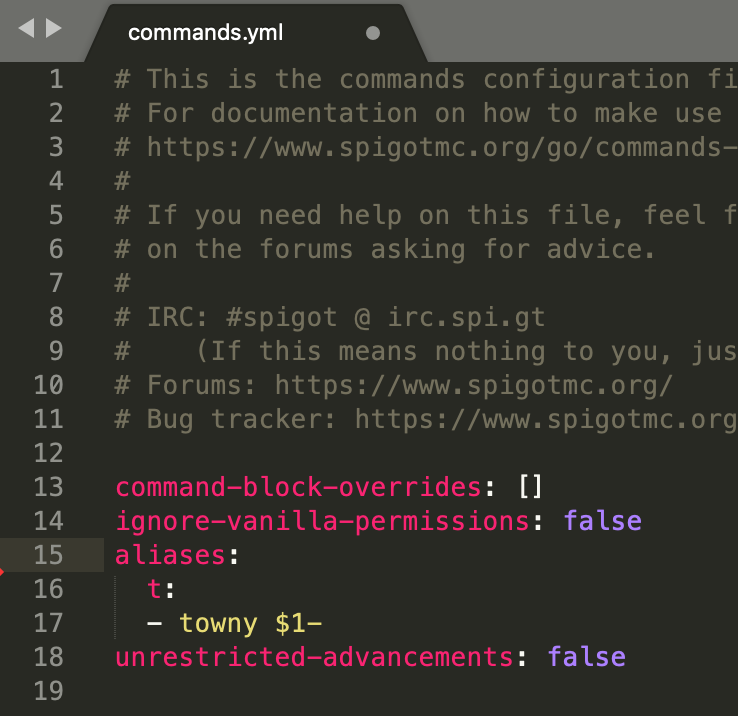
ChatControl breaks Towny command /t!
Warning
- Remove the "t" alias from Private_Messages.Tell_Aliases in settings.yml
- Place the following command alias in commands.yml in your root server folder:
ChatControl won't override /w or other aliases for private messages!
Tip
Add
aliases:
  w:
  - []
to commands.yml in server directory to fix this.
🛡️ Antispam And Rules
How to edit antispam messages ('You have to wait X seconds', 'Please do not post the same or similar message', etc.)?
Tip
Edit in localization/messages_en.yml. See Localization.
How to allow my server's domain or IP address in chat?
Tip
Open rules/global.rs, find "ignore string minecraft:|youtube.com|imgur.com" and add "|yourdomain.com" at the end.
My URL / domains are broken / not clickable / all dots removed!
Warning
- If using Essentials, give players
essentials.chat.urlandessentials.msg.url - Don't use "Suggest_Command" in format parts — it breaks links
- Since ChatControl 11, use MiniMessage for clickable links:
<click:open_url:'https://google.com'>link</click>. Use https://webui.advntr.dev/ for help. - Set
Make_Chat_Links_Clickableto true in the proxy settings.yml (BungeeControl/VelocityControl) for automatic chat links on your network
Rules, channels or chat don't show or show when not supposed to (Towny/Factions/Plot Squared, ...)
Warning
Set Chat_Listener_Priority to LOWEST in settings.yml and restart. This makes ChatControl process chat before other plugins. On 1.16+, try LOWEST-MODERN if LOWEST alone doesn't work. See Listener Priorities for specific plugin combinations.
Rules don't work for my non-English server - I use Cyrillic / special characters but they are not matched.
Tip
Set Rules.Strip_Accents to false in settings.yml.
How to prevent spamming one character or limit it to 1 repeat maximum?
Tip
There is a default rule for that hidden in rules/chat.rs, remove # from the two lines after the first line. Edit {3} to change how many characters to allow.

Tab completion does not work correctly!
Tip
Make sure you have tab-complete set to -1 in your spigot.yml.
I am getting kicked when removing messages with [X]
Tip
Give yourself "chatcontrol.bypass.spamkick" permission.
I am getting kicked when I chat!
Warning
If using ViaVersion, disable PacketEvents integration in settings.yml.
🎨 Colors and Formatting
MiniMessage tags not working (<underlined>, <strikethrough>, etc.)
Players need the corresponding permission: chatcontrol.color.underlined, chatcontrol.color.strikethrough, etc. Color names are lowercase with underscores, e.g. chatcontrol.color.dark_blue. For hover/click: chatcontrol.action.hover, chatcontrol.action.click.
Hex/RGB colors not working in placeholders
Use MiniMessage <#123456> format. Legacy 𞉀 may not work in all contexts since ChatControl 11.
&k (obfuscated) format causing visual issues
This is Minecraft's intended behavior. Requires chatcontrol.color.obfuscated permission.
</click></hover> parsing errors
Ensure matched open/close tags. Tags from one format part don't carry over to the next.
🔗 Discord
Discord integration does not work / stopped working!
Tip
Set the "Debug" option in settings.yml to "[discord]", restart, and check console messages for instructions.
Discord→Minecraft rules: operator ordering matters
When writing rules that apply to messages coming from Discord, the match operator must come before any require perm or other condition operators. If require perm is placed before match, the rule will try to check permissions on the Discord bot user (which has none) and silently fail.
Wrong:
require perm chatcontrol.emoji
match :smile:
then deny
Correct:
match :smile:
require perm chatcontrol.emoji
then deny
Use ignore discord in rules that should not apply to Discord messages, or require discord for Discord-only rules.
I cannot use @ mentions or my discord plugin broke when ChatControl is installed!
Info
We unsend and resend messages through our system for filtering. This may conflict with other Discord plugins. Toggle this in the Discord section of settings.yml.
✨ Placeholders
The {server_name} is wrong!
Tip
If you use PlaceholderAPI with the server expansion, it will override ChatControl's placeholder. Change the server name in PlaceholderAPI's config instead.
PlaceholderAPI placeholders not working in toasts
Toast notifications have limited variable support due to how Minecraft renders advancements. Some PlaceholderAPI placeholders may not parse correctly in toasts. Test with simple variables first.
{} placeholders not resolving
Ensure the variable exists in variables/ or PlaceholderAPI is installed. Check for typos.
📦 The [item] Variable
What is [item]?
Lets players show their held item in chat with hover details (enchantments, lore). Configure in variables/item.yml.
How to put brackets around the [item] variable so it shows "I hold [Stone]"?
Tip
Adjust your Javascript in variables/item.yml slightly, here is an example:
Value: |-
    displayName();

    function displayName() {
      var item = player.getItemInHand();
      var itemMaterial = item.getType().toString();

      if (item == null || itemMaterial.equals("AIR") || itemMaterial.contains("_AIR"))
        throw "event handled: You must be holding an item to use [item]!";

      var metadata = item.getItemMeta();

      if (metadata != null && metadata.hasDisplayName())
        return "\&8[&d" + metadata.getDisplayName() + "\&8]";

      var wordUtils = Java.type("org.apache.commons.lang.WordUtils");
      var name = item.getType().name().toLowerCase().replace('_', ' ').replace('_', ' ');

      return "\&8[&d" + wordUtils.capitalize(name) + "\&8]";
    }
Server freeze or crash with [item]
Items with huge NBT (Shulker Boxes, heavily-modded items) can freeze the server. Newer variables/item.yml versions include a 256-character size limit. If yours doesn't, regenerate it or add the check manually.
[item] error spam in console
If you see repeated errors about [item], this is typically caused by items with incompatible NBT tags from other plugins or modded items. Enable Debug with [variables] in settings.yml to see which item is causing the issue.
Security: click/hover tags inside [item]
Security Warning
Players could potentially craft items with display names containing MiniMessage click/hover events (e.g., <click:run_command:'/op player'>Click me</click>). If your server allows custom item names (via anvils or plugins), ensure you have rules in place to strip dangerous tags from item names, or disable the [item] variable entirely if this is a concern.
[item] not parsing with gradient/color plugins
Some third-party color plugins may conflict with the [item] variable parsing. Ensure ChatControl processes chat before the color plugin by adjusting your Listener Priorities.
🌐 Proxy / VelocityControl
VelocityControl errors when stopping the server
If you see errors about delayed shutdown when stopping a server, this is caused by pending database operations. Ensure your MySQL server is responsive and has enough connections available. This is harmless and does not affect data integrity.
Duplicate messages with other proxy plugins (Staff++, etc.)
Ensure only ChatControl handles join/quit/switch messages. Disable equivalent messages in the other plugin, or remove the conflicting message type from Messages.Apply_On in the proxy settings.yml.
Messages not showing on specific servers
Check Messages.Ignored_Servers in your proxy settings.yml. Also verify Server_Name in ChatControl's proxy.yml matches the name in your proxy configuration (case-sensitive).
Cannot forward commands from proxy console
Set Enable_Forward_Command: true in proxy settings.yml and restart. This is disabled by default for security. Only the proxy console can forward commands — players cannot.
Commands forwarded to empty servers are silently dropped
If you use /chc forward to send commands to another backend server and no players are on that server, the command will not execute. This is because the proxy messaging channel requires at least one connected player on the target server to relay messages. This is a BungeeCord/Velocity limitation, not a ChatControl bug.
Toggle join/leave messages per-server on proxy
Use ignore sender server or require sender server operators in your join.rs / quit.rs files. See Proxy for details.
⚡ Folia
Kicked on advancement messages
Disable advancement-related messages or exclude them from Messages.Apply_On.
Database caching issues
Use MySQL or MariaDB. SQLite may have more threading issues on Folia than remote database.
General Folia compatibility
Folia support is experimental. Known limitations: some timed broadcasts may not fire, console filtering may differ, PacketEvents features may not work. Report issues on GitHub with [Folia] in the title.
🎫 Still Stuck?
Tip
Open a ticket on our GitHub Issues — our AI assistant typically responds within minutes and can help resolve most issues on the spot.